Frequently Asked Question
Description
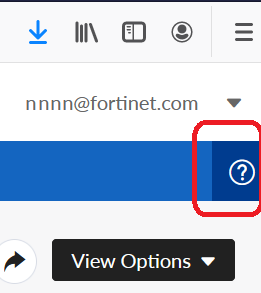
This article describes how to use the Fortinet Support Portal for Product Registration, Contract Registration, Ticket Management, and Account Management. The Fortinet Support Portal provides a range of functionality that allows Fortinet customers to create their support accounts, register their Fortinet products and contracts, download the latest Firmware Images, and create support requests. Access to some of these services is governed by the support entitlement of current FortiCare and FortiGuard Service contracts. This article provides a number of attachments that describe how to use features within the Fortinet Support Portal. Note: The Fortinet Support Portal was updated on February 7th, 2021 and the changes have not yet been reflected in this article. This will be completed shortly. There is a help function built into many of the new portal pages which explain how to use the portal.
Scope FortiCare.
Solution
The following attachments to this document provide step-by-step guides on how to use the Fortinet Support Portal. Account Management:
- 1.01 Create a support account
- 1.02 Create and edit a sub-account
- 1.03 Recover a lost account ID and password
- 1.04 View and edit a support account
Asset Management:
- 2.01 How to register a new product
- 2.02 Modules and chassis registration
- 2.03 Add or renew a support contract
- 2.04 Virtual machine (VM) license registration
- 2.05 LENC license registration
- 2.06 Online renewal for US customers (USA/Canada only)
- 2.07 Register a product after an RMA
- 2.08 VDOM license registration
- 2.09 Premium support service registration
- 2.10 Update product description and partner info
- 2.11 Update the product location address
- 2.12 Generating reports from the support portal
- 2.13 View the details of a product and service entitlement
- 2.14 How to move a contract that has been registered against the wrong Serial Number
- 2.15 Troubleshooting: license not updated or available on the GUI
- 2.16 How to activate FortiToken Mobile Trial
- 2.17 Fortinet Warranty Support Start Policy
- 2.18 How to use the Decommissioned Products list
Assistance Center:
- 3.01 Ticket Creation Guide
- 3.02 View and update an active ticket
- 3.03 Web chat assistance
- 3.04 Run reports on the tickets
Download Center:
- 4.01 Firmware images download
- 4.02 FortiGuard service updates
- 4.03 HQIP image downloads
- 4.04 Verify the checksum of a firmware image
Support Portal:
- 5.01 2FA-related documents can be found in this article: Customer Service Tip: Two-Factor Authentication (2FA) resource list
Related articles:
Customer Service Note: Using the Support Portal Decommissioned Products list
1.01 Create a support account.pdfPreview file878 KB 1.02 Create and edit a sub account.pdfPreview file539 KB 1.03 Recover A Lost Account ID and Password.pdfPreview file532 KB 1.04 View and Edit a Support Account.pdfPreview file431 KB 2.15 License not Updated on GUI.pdfPreview file112 KB 2.16 How to activate FortiToken Mobile Trial.pdfPreview file81 KB 2.17 Fortinet Warranty Support Start Policy.pdfPreview file180 KB 2.18 How to use the Decommissioned Products list.pdfPreview file462 KB 3.01 Ticket Creation Guide.pdfPreview file1725 KB 3.02 View and update an active ticket.pdfPreview file621 KB 3.03 Web Chat Assistance.pdfPreview file1036 KB 3.04 Run reports on your tickets.pdfPreview file585 KB 4.01 Firmware images download.pdfPreview file172 KB 4.02 FortiGuard Service Updates.pdfPreview file219 KB 4.03 HQIP image downloads.pdfPreview file185 KB 4.04 Verify the Checksum of a Firmware Image.pdfPreview file168 KB 2.14 How to move a contract that has been registered against the wrong Serial Number.pdfPreview file115 KB 2.13 View the details of a Product and Service Entitlement.pdfPreview file295 KB 2.01 How to register a new product.pdfPreview file382 KB 2.12 Generate reports on your registered products.pdfPreview file409 KB 2.02 Asset Management_Modules and Chassis Registration.pdfPreview file465 KB 2.10 Update the Product Description and Partner Info.pdfPreview file505 KB 2.06 Online renewal service for USA and Canada customers .pdfPreview file737 KB 2.09 Premium Support Service Registration.pdfPreview file845 KB 2.08 VDOM license registration.pdfPreview file938 KB 2.03 Add or renew a support contract.pdfPreview file951 KB 2.11 Update the Product Location.pdfPreview file931 KB 2.05 Asset Management_LENC License Registration.pdfPreview file951 KB 2.07 Register a Product after an RMA.pdfPreview file189 KB 2.04 Virtual Machine (VM) License Registration.pdfPreview file482 KB