Frequently Asked Question
| Description | This article explains the possible reasons why FortiGate is unable to connect FortiGuard servers and offers steps to troubleshoot the problem. The 'Unable to connect to FortiGuard servers' error message can be seen in two places under Dashboard -> Status -> Licenses.
FortiOS v7.6.x:
 |
| Scope | FortiGate, FortiWeb. |
| Solution | The communication between FortiGate and FortiGuard for web filtering and antispam is different from the communication for antivirus and IPS. If public FortiGuard services or servers are suspected to be down in one or more regions (s), the following link provides status, outage, maintenance etc for such services:FortiGuard Anycast Query Status
execute ping service.fortiguard.net execute ping update.fortiguard.net execute ping guard.fortinet.net execute ping securewf.fortiguard.net [ for HTTPS service ]  If DNS resolves but there is no ping, check the routing table (get router info routing-table all) to determine the best route for FortiGuard services (if ISDB is used in SD-WAN/policy route or static route) or the default route. If all traffic is sent via an IPsec tunnel, ensure that:
If SD-WAN is configured as the default route, verify:
config system fortiguard set interface-select-method sdwan end See: Technical Tip: Functionality of 'set interface-select-method' for local-traffic with SD-WAN for more information. Note: Suppose connectivity to FortiGuard is required through one of the outgoing interfaces. In that case, it is possible to use 'interface-select-method' with the 'specify' action and then select the outgoing interface under the FortiGuard configuration. config system fortiguard set interface-select-method {specify} set interface end If the DNS resolves and is able to ping, move to Step 2. If it is not resolving, check the DNS configuration.  Another possible FortiGuard connectivity failure scenario is where the FortiGate 'Time Settings' are set up manually with wrong time and date. The solution is to either adjust the time settings or switch it to using an NTP server. For example:  Time settings menu can also be accessed through CLI: config system ntp ....... One of the most possible causes is when the 'Use FortiGuard Servers' option is changed to 'Specify' for use with an internal DNS server, without switching the DNS protocols or validating if the new DNS Server supports DoT (default setting of FortiGuard servers) which uses TCP 853 or DoH that uses TCP 443. If that happens, the DNS server will be unreachable, and DNS resolution will not work, as seen in the next picture.  After changing to UDP 53, the DNS will be reachable, and the resolution should start working. The following are the commands to change the protocol via CLI: config system dns set protocol cleartext <----- DoT is for using TCP/853, and cleartext is used for UDP/53. end  In some cases, verify the system DNS config. Check any source-ip config and make sure the IP configured is public-facing and not an internal IP address. This is because the DNS needs to communicate with the public WAN to be able to reach the FortiGuard servers. If there are any internal 'source-ip' configured, unset to default (0.0.0.0) or configure a public-facing IP. config system dns set source-ip 0.0.0.0 <- default
diagnose debug rating 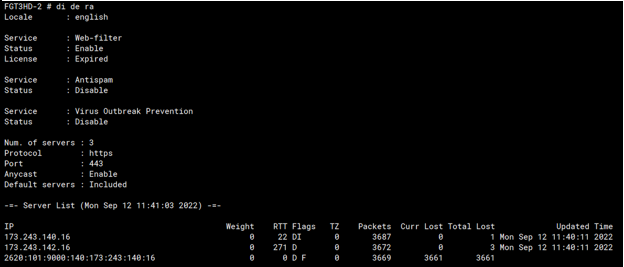 The output of the command 'diagnose debug rating' displays flags next to the servers:
The IP address FortiGate received when resolving the name service.fortiguard.net. If the administrator has not overwritten the FortiGuard FQDN or IP address in the FortiGuard configuration, there are usually two or three servers with this flag. S: The IP address FortiGate received from FortiManager. T: The server is not replying to FortiGate queries. F: The server is down. If all servers in the list have failed, this may mean either that all FortiGuard servers on the Fortinet side are down (unlikely) or that this FortiGate has a problem reaching them at the network level. If the PPPoE interface is being used as a WAN interface, review the MTU value and configure TCP-MSS on the PPPoE interface. fnsysctl ifconfig -a The PPPoE interface name will be displayed as 'ppp(x)'. ppp1 Link encap:Point-Point Protocol The MSS value should be = MTU - 40: Technical Tip: Cannot view some web sites when using PPPoE. For example, if the MTU of the PPPoE interface is 1492: config system interface Even if the FortiGate is not using PPPoE, there could still be MTU issues along the path, either in the directly connected ISP or a transit ISP. Lowering the MTU is still a valid test. The best way to determine if there are MTU issues along the path is to perform a packet capture for the FortiGuard server IP the FortiGate is connecting to, and if the larger packets after the initial TCP handshake (1500 bytes MTU) do no get ACK'ed, it means they are getting dropped somewhere and MTU could be the reason. If a VPN interface is being used as a WAN interface to reach Fortiguard servers, the MTU can be set as 1400 as follow: config system fortiguard An adjustment is made in the VPN interface: config system interface end
However, from firmware v7.2 onwards in multi-VDOM mode, users can choose from which VDOM FortiGuard services and updates are initiated instead of being locked to the management VDOM. config global
config vdom edit root config system vdom-dns set vdom-dns enable set primary 208.91.112.53 set primary 208.91.112.52 end next end To set up FortiGuard services on a non-management VDOM:
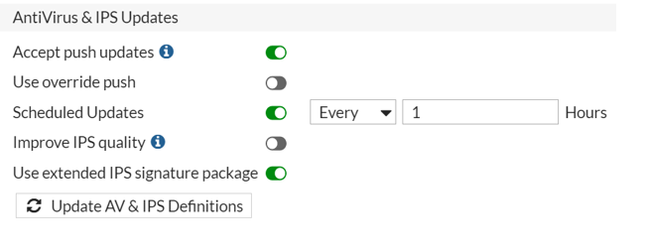 v7.2.x: The active subscriptions under System -> FortiGuard are being updated with the 'FortiGuard Updates', the options for 'AntiVirus & IPS Updates' have been removed.  v7.6.x: The active subscriptions under System -> FortiGuard -> Subscriptions -> Licensed are being updated with the 'FortiGuard Updates' System -> FortiGuard -> FortiGuard settings.   Check Filtering Services under System -> FortiGuard -> Filtering. 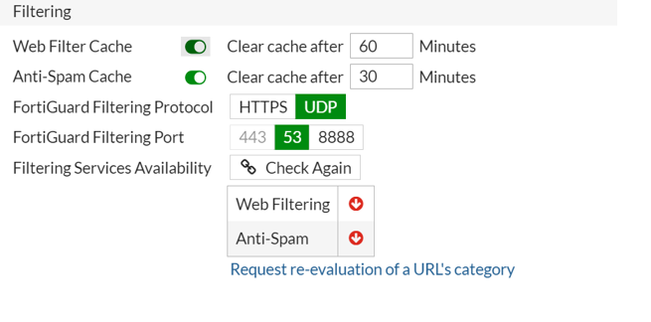 v7.6.x: Check Filtering Services under System -> FortiGuard -> FortiGuard settings and then expand the Filtering option.  Anycast servers: If FortiGuard is not reachable via the default Anycast method, it is suggested to disable Anycast and switch back to unicast servers (Anycast communication). config system fortiguard set fortiguard-anycast disable set protocol udp set port 8888 set sdns-server-ip 208.91.112.220 173.243.140.53 210.7.96.53 end For FortiGuard's SDNS rating service, there are two modes in FortiOS: Mode 1: Use of unicast network, which uses the DNS over UDP protocol for FortiGate and FortiGuard transactions. Mode 2: Use of Anycast network (default), which uses DNS over TLS protocol for FortiGate and FortiGuard transactions.
config system fortiguard set fortiguard-anycast disable set sdns-server-ip 208.91.112.220 173.243.140.53 210.7.96.53 end
config system fortiguard set fortiguard-anycast enable end With Anycast, FortiGate is only aware of one single server IP. This is a floating IP address that will connect to the closest server geographically, and if this server is down, it will point to another server instead. With Unicast, the FortiGate must maintain a list of servers that it tries, and if one stops working, it then switches over to another. 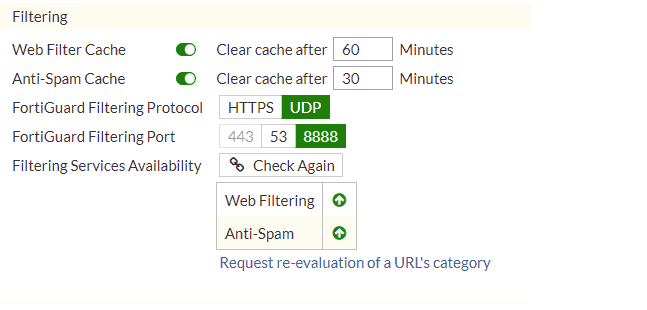 In many cases, problems related to FortiGuard are caused by ISPs. Some ISPs block traffic on port 53 that is not DNS or that contains large packets. In those cases, the solution is to use port 8888. Other ISPs block traffic to HTTPS port 8888. In those cases, the solution is to use UDP port 53. There are also a few cases where ISPs block traffic based on source ports. Changing the source port range for FortiGuard with a range below usually fixes the issue: config sys global set ip-src-port-range 1031-4999 Related port information:
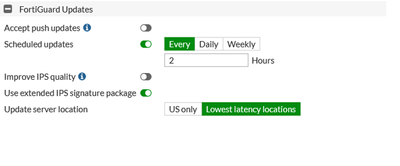 v7.6.x: This can also be done under System -> FortiGuard -> FortiGuard settings.  Some debug commands for FortiGuard: diagnose debug reset diagnose debug application update -1 diagnose debug console timestamp enable diagnose debug enable Force FortiGuard update after running debug application update -1: execute update-now The following command can also fix various issues with FortiGuard servers. In this example, 212.48.23.12 is used as the IP for the interface to the ISP router. config system fortiguard set fortiguard-anycast disable set protocol udp set port 8888 set sdns-server-ip 208.91.112.220 173.243.140.53 210.7.96.53 set ddns-server-ip 173.243.138.225 set source-ip 212.48.23.12 end config system dns set primary 8.8.8.8 set source-ip 212.48.23.12end Source IP should match the IP address on the WAN port of FortiGate (ISP port), If the Source IP is changed, DNS and FortiGuard settings should be changed as well. Note:Despite changing the FortiGuard settings to anycast disable and configuring the UDP protocol to reach the FortiGuard servers, the connection still fails because the DNS servers will still use the 'DNS over TLS' settings, which is a default setting. In this case, public IPs will be reachable, but DNS resolution fails. Changing the DNS settings to use 'DNS over UDP' will help in resolving the domain names properly.
diagnose debug application update -1 diagnose debug console timestamp enable diagnose debug enable execute update-now In this case, the output of the debugs looks like:
Try to use 'interface-select-method' with the 'specify' action and then select the outgoing interface under the FortiGuard configuration as mentioned above.
License errors may be found in two places, as shown below:
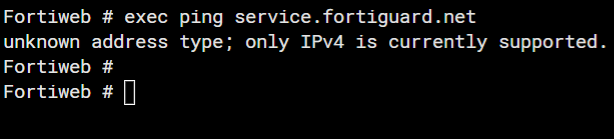 Verify DNS settings in FortiWeb under Network -> DNS. Verify the reachability of the DNS IP. If the DNS is private, change to a public DNS and verify the connectivity. If the DNS resolves, check reachability. If there is any firewall, allow the ICMP for FortiWeb.
diagnose debug application fds 7 diagnose debug console timestamp enable diagnose debug enable To disable the debug: diagnose debug disable diagnose debug reset FortiGuard licenses and the communication to FortiGuard are viewable via GUI through System -> FortiGuard as well as through the CLI using the following commands: diagnose autoupdate versions The output is quite long, but it is possible to pipe the output to grep: diagnose autoupdate versions | grep -A6 "IPS Attack Engine"
diagnose debug rating The Web Filter should be licensed:  Check the firewall policy. If there is no Web Filter Profile configured in the firewall policy, the web filter will be shown as disabled in the 'diag debug rating' output. Note: If the error persists after applying changes, try accessing the same page in another browser or a private window, as the browser might be displaying a cached version of the page. To change the FortiGuard anycast status from disabled to enabled: config system fortiguard set fortiguard-anycast enable set fortiguard-anycast-source fortinet end Run a sniffer to check the communication between FortiGuard servers and the FortiGate. In this example, the port communication is 8888. This will depend on the port used for communications between FortiGuard servers and the FortiGate. FGT81E-1 (root) # diagnose sniffer packet any "port 8888" 4 0 l Make sure the there is communication between both ends. |