Frequently Asked Question
Description
This article describes a solution for an issue where SSL VPN connection attempts halt at 40% progress, displaying the warning message 'VPN connection cannot be established. The VPN server might be unreachable. (-5).'
Scope
SSL VPN with FortiClient.
Solution
This error can occur due to the following reasons:
- An encryption mismatch between FortiClient (Windows) Workstation and FortiGate SSL VPN Settings. On the FortiClient (Windows) workstation search bar, go to Internet Explorer (open cmd and type 'iexplore' - it will redirect to Microsoft Edge). Enter Options in the search bar -> Internet options will be grayed out -> Change IE Mode to allow under 'Allow sites to be reloaded in Internet Explorer mode (IE mode)' -> select Advanced (under internet properties). Change the TLS settings to match the settings on the FortiGate:
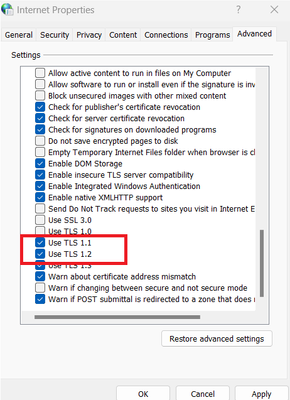
For example, if TLS 1.1 and TLS 1.2 are enabled on the FortiGate, enable them in Internet Explorer as well.
- Due to a system issue that occurs when handling the SSL Daemon. To confirm there is a system space issue, use the get system performance status command. This will display the kernel's own CPU usage: the processes related to running the operating system.
get system performance status
CPU states: 0% user 12% system 0% nice 100% idle 0% iowait 0% irq 0% softirq
CPU0 states: 14% user 86% system 0% nice 0% idle 0% iowait 0% irq 0% softirq
CPU1 states: 0% user 0% system 0% nice 100% idle 0% iowait 0% irq 0% softirq
For more information, see Technical Tip: Debugs for troubleshooting high CPU issues.
To view the state of the system processes and CPU cores used by the SSL VPN Daemon, run the following:
diagnose sys top | grep sslvpnd
sslvpnd 354 R 99.8 0.3 0
The SSL service within the system process has a CPU utilization of approximately 99% and is handled by Core 0. This causes the SSL Daemon to malfunction, resulting in FortiClient getting stuck at 40%, and unable to establish the VPN connection.
To view all running system processes, run the following command:
diagnose sys top
Run Time: 13 days, 15 hours and 19 minutes
6U, 0N, 6S, 88I, 0WA, 0HI, 0SI, 0ST; 7979T, 2656F
sslvpnd 354 R 99.8 0.3 0
httpsd 18032 S 0.5 0.3 6
ipsengine 459 S < 0.1 1.4 6
node 251 S 0.1 0.9 5
forticron 259 S 0.1 0.3 6
flcfgd 311 S 0.1 0.2 7
ipshelper 269 S < 0.0 3.3 4
ipsengine 453 S < 0.0 1.5 0
ipsengine 457 S < 0.0 1.5 4
ipsengine 454 S < 0.0 1.4 1
ipsengine 455 S < 0.0 1.4 2
ipsengine 456 S < 0.0 1.4 3
ipsengine 458 S < 0.0 1.4 5
cmdbsvr 215 S 0.0 0.8 5
appDemo 177 S < 0.0 0.8 4
If the SSL Daemon is malfunctioning, the debug command may not be able to display any output,
diag debug reset
diag debug application sslvpn -1
diag debug console timestamp enable
diag debug enable
diag debug disable <----- To stop the debugging. The user can keep typing while the log fills up. The console will take the keyboard input.
A packet capture taken for the source IP from where the connection attempt is being made will show the packets still reaching the FortiGate with the TCP handshakes getting established, however the output for the 'sslvpn debug' as mentioned shows nothing and if this is the case proceed to restart the sslvpnd process or re-enable the status of the SSL VPN interface and settings.
Command for packet capture:
Example:
diagnose sniffer packet any 'host x.x.x.x and port 30443' 4 0 a <----- Replace x.x.x.x with the source public IP and 30443 with the actual sslvpn listening port.
To resolve this issue, restart the SSL running processes or re-enable the status of the SSL VPN interface and settings.
To kill or restart all of the sslvpnd processes, run the following command:
fnsysctl killall sslvpnd
To re-enable the SSL status:
config system interface
edit "ssl.root"
set vdom "root"
set status down/up
set type tunnel
set alias "SSL VPN interface"
set snmp-index 16
next
end
config vpn ssl settings
set status disable/enable
next
end
Once the SSL Daemon has restarted and returned to normal function, users will be able to successfully establish VPN connections.
diagnose sys top | grep sslvpnd
sslvpnd 18258 S 0.4 0.2 2
If the error 'Unable to establish the VPN connection. The VPN server may be unreachable, or the identity certificate may not be trusted. (-5)' appears, follow the instructions in:
If this article does not resolve issues with establishing an SSL VPN connection and the progress bar still halts prematurely, see Troubleshooting Tip: Possible reasons for FortiClient SSL VPN connectivity failure at specific perce....